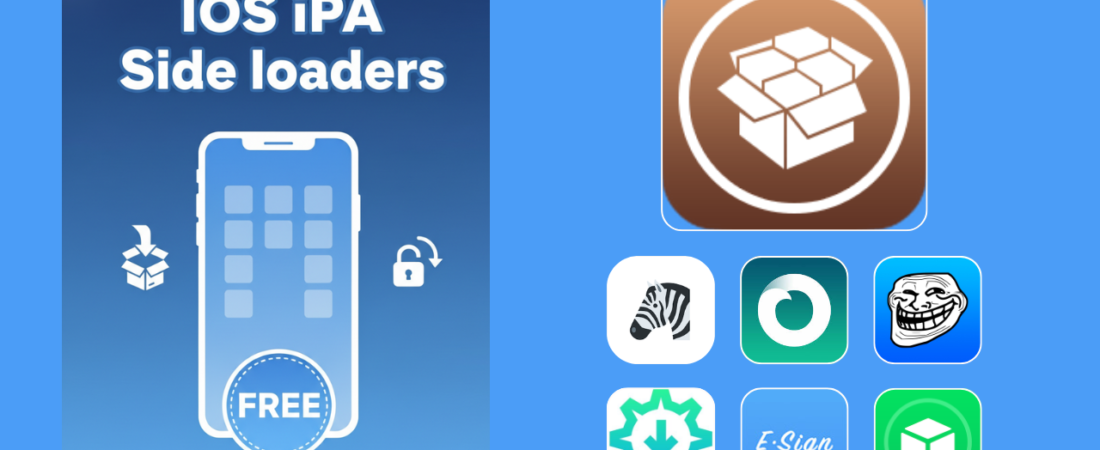
iOS IPA Sideloading is a method that allows iOS app Developers and users to install apps on Apple devices without using the official App Store.
This Process is known as side-loading. This can be achieved through using various tools, most of which are free. But potentially unstable, like Scarlet, U04S, ZeeSigner. Users can also use paid subscription services such as SideloadMaster, Udidmaster, Signulus, AppDB Pro, Ksign Patcher, Esign Patcher, Feather iOS Patcher, Troll Tool Online, and 9 Installer.
Alternatively, users can use computer-based utilities such as AltStore and Sideloadly. These online tools require a developer account (which can be obtained using an Apple ID and Password) or frequent manual updates to keep sideloaded apps active.
Each approach offers a different balance of cost, convenience, and technical requirements depending on whether the user has access to a desktop. Ultimately, these techniques allow for the installation of custom IPA files and restricted applications that are otherwise unavailable on iOS.
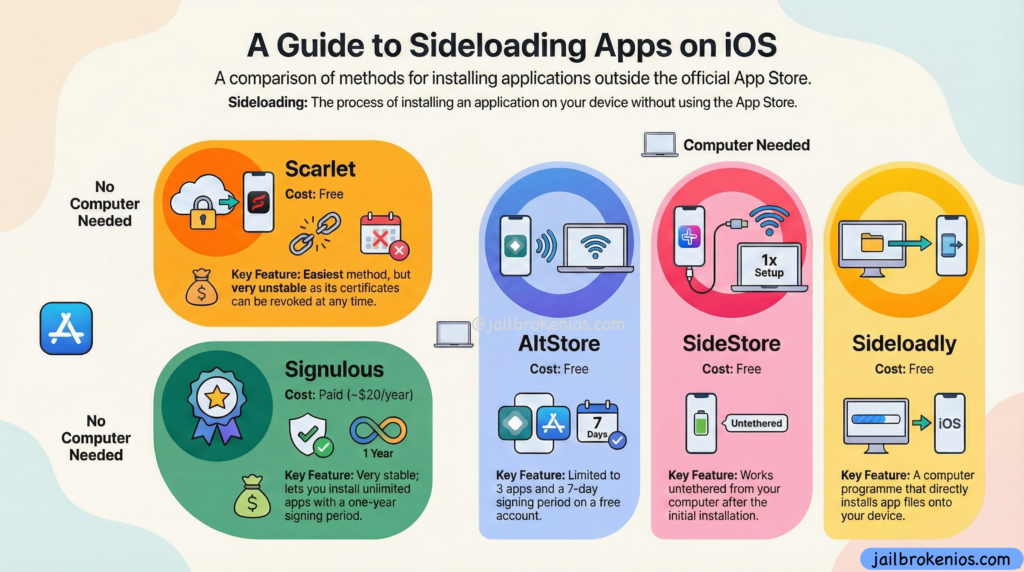
A Guide to iOS iPA Sideloading Apps on iOS:
To sideload the .iPA /.TiPA(Trollstore) File users need a Sideloading tool, as described above. There are various tools available; some require a PC or Mac, and others function as on-device IPA signers. They can also be downloaded online. Below, we list the most secure and easy-to-understand tools, ranked by popularity.
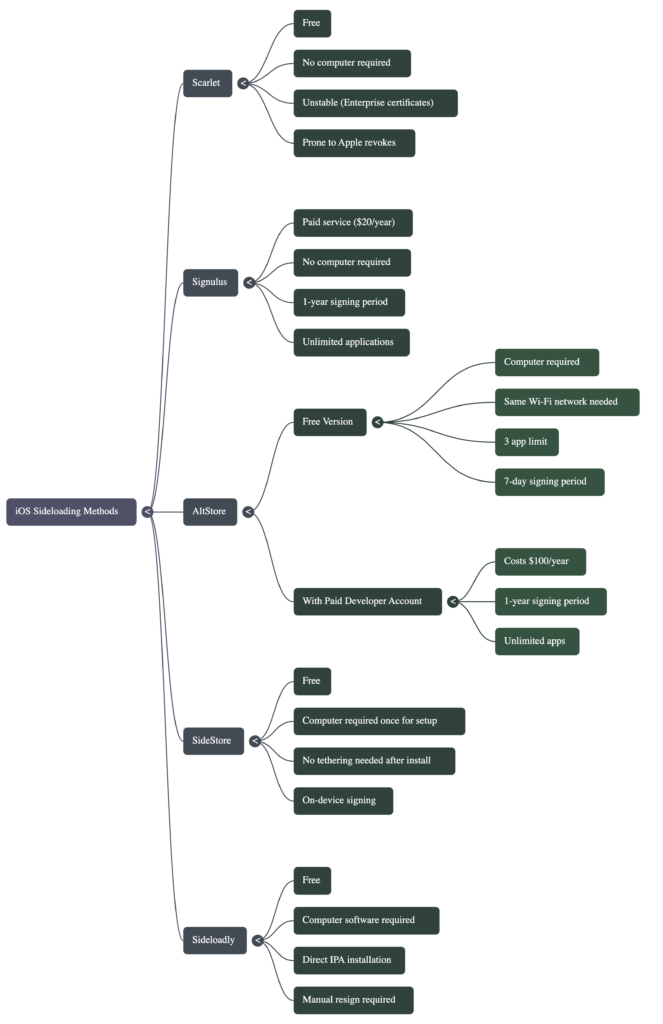
A Comparative Taxonomy of iOS iPA Sideloading Architectures
Best iPA Signers in 2025
ZeeSigner – Online iOS IPA Sideloading / Signer Tool 2025
ZeeSigner is a free, untethered online IPA sideloading tool that works on both iPhones/iPads. With the free certificate selection option, users can change the signing certificate file and then install the app by selecting the certificate. They can also install anti-revoke DNS profiles to protect the app revocation.
ZeeSigner also offers a Premium Subscription plan that helps users keep their apps in an untethered environment with an anti-revoke protection layer. We highly recommend that users subscribe to keep their apps and accounts protected, as it safeguards apps and logged-in account data for 365 days. Also, their(ZeeSigner Tool) advanced AI-based anti-revoke protection mechanisms notified users up to 1 month before the app’s expiration, allowing them to back up and keep their important data in those apps.
U04S Store – Online iOS iPA Sideloading Signer
U04S is another popular IPA signing tool that initially offered only unc0ver jailbreak sideloading, but with the latest update, users can now install Tweaked and Jailbreak apps freely. U04S also provides a Premium signing option(up to $20) that differs from those offered by other tools. One of the U04S Team members will assist the user in installing iOS apps and configuring the U04S app.
The U04S tool contains the most popular IPA files, such as unc0ver, Dopamine, Xina15, TrollStore, and MisakaX. Additionally, for VIP users, it includes an option to request on-demand app signing.
Scarlet – Online iPA Signer
Scarlet is no-PC required and free. It also works with a globally available Apple Distribution Certificate file. As a result, this tool was unstable. If Apple detects that the enterprise certificate is revoked, all users worldwide who use apps signed with it will be prompted to cancel it. This means the apps are no longer working and display a “Untrusted Developer” or “Unable to Install” notification.
Signulus – Paid iOS IPA Sideloading /Signer Tool.
Signulus is a paid iOS IPA Sideloading signer tool. With the premium subscription, you can sign and install an unlimited number of IPA files to your iDevice. The Signing subscription is valid for one year; after that, you will need to renew it. The significant disadvantage of this tool is that it lacks anti-revoke protection. If Apple revokes the current certificate, the apps will no longer work. You can install IPA files on a device without a PC, and no jailbreak is required.
iOS IPA Sideloading / Signer Tools – NEED PC 2025
If you have a PC or Mac, you can use the following free IPA Sideloading tools to sideload IPA files onto your iDevice. The significant disadvantage of this method is instability. It means those apps may stop working after a specific number of days.
Most apps are not working after 7 days. Also, users can install up to 10 apps. Also, if the app has expired, the user needs to reconnect their iOS device to the PC or Mac, sign in, then sign in again. This may be insecure for app and account data. This means you need to relaunch the apps (e.g., Facebook, YouTube). If an update is available, you can’t update the current app using these tools without losing log data.
Sideloadly – iPA Sideloading Tool _ Need PC
Sideloadly is a Free Ondevice IPA sideloading/Signing tool. To use this software, users need a PC/Mac. Also, this tool now supports Windows, Mac, and Linux. To use this app, users need to connect their iDevice to a PC/MAC using a cable, and may also need some technical knowledge to set up the app.
Also, you need to provide your Apple ID and Password to create a temporary Developer account. Then download the desired IPA file using Zee IPA Library, then drag & drop it into the Sideloadly tool. Then it may be able to change the app bundle ID and app data, and then start the signing process.
Note* users can sign and install only 10 apps. Also, the installed apps need to be resigned after 10 days.
SideStore – Sideloading Tool – Need PC
SideStore. An alternative app store for seamless sideloading. No jailbreak needed, and no computer after the initial install, only a Wi-Fi connection. This is also a free IPA signing tool, but once you set it up, you must connect to the same Wi-Fi network. Also, this tool works like an ondevice IPA signer.
AltStore – Ondevice iPA Sideloadler
AltStore is another popular IPA signer tool. It requires a PC or Mac for the initial setup. Once you install the software, you don’t need to connect your device to the PC, but you must keep the iDevice and PC on the same Wi-Fi network to re-sign the app every 7 days. Alt Store has its own IPA library, and users can also download IPA files and import them into Alt Store. Due to Apple’s restrictions, most IPA files do not work as expected.
This tool can be used both as a Paid and a Free tool. The Free method, as mentioned above, requires you to keep your iDevice connected to the same Wi-Fi network. Also, it has a limit of only three apps. This means you can sign only three applications.
Paid version users need a paid Apple Developer account (which may cost $100 per Year). The apps are valid for one year, and users can install unlimited apps.
Note – You can get AltStore-compatible paid Developer Accounts under – $25 via udidmaster.com
What is the primary reason the Scarlet method is considered ‘unstable’ for sideloading applications?
It relies on Enterprise certificates, which Apple can revoke at any time.
That’s because Scarlet uses Enterprise certificates, Apple can invalidate them, causing installed apps to stop working without warning.
For a user who does not have a computer and is willing to pay for convenience, which sideloading service is recommended for its one-year signing period and unlimited app installations?
9 Installer
Ksign Patcher – (Ksign iPA Signer)
Esign Patcher – Esign iPA Signer
Zee Signer
Signulus
The top-paid option for those without a computer costs £20 per year.
What are the two main limitations when using AltStore with a standard, free Apple account?
A seven-day signing period and a limit of two sideloaded apps (plus AltStore itself).
Because free accounts must re-sign apps weekly and are limited to three apps total, one of which is AltStore.
What is the key difference in the requirements for a computer between AltStore and SideStore, as described in the video?
AltStore requires a computer for every app installation, whereas SideStore only needs it for the initial setup.
The SideStore removes the need to be ‘tethered’ to a computer after the first installation.
How does the process of installing an app with Sideloadly differ from using an on-device service like AltStore?
Sideloadly installs the app directly from a computer application, bypassing the need for a ‘middleman’ app on the phone.
Connect your phone, drop the .ipa file into Sideloadly on your computer, and it installs directly.
How to achieve a one-year signing period and an unlimited number of sideloaded apps using methods like AltStore and Sideloadly?
By using a paid Apple developer account.
You need to pay Apple $100 a year for a developer account, which grants these privileges.
Sideload iOS iPA files – Tweaks, Customization, Utilities
By using the iOS IPA sideloading apps above, you can sideload more IPA files. The following are some of the most important and well-known IPA files you can try to sideload.
VansonMod: The OS memory editor, iOS pointer analysis, RVA patcher, and process manager for TrollStore (jailbreak optional) are essential tools. This solution includes powerful hex-editing capabilities that enhance your productivity and efficiency. Download VansonMod
Dopamine (formerly Fugu15 Max): A rootless semi-untethered Jailbreak tool for iOS 15 – iOS 16 running Devices, for arm64 (A8 – A11) and arm64e (A12 – A16, M1 – M2) Download DOpamine